
Vehicle Counter
- Version
- Free, with ads
- Includes
- Counting, dashboard, 3-day history, CSV
Vehicle Counter — AI Traffic Counter / Android
Point an Android phone at a road. Vehicle Counter detects and tracks every vehicle, counts it by type and direction, and keeps the traffic data on the device. No road tubes, no cloud, no account.
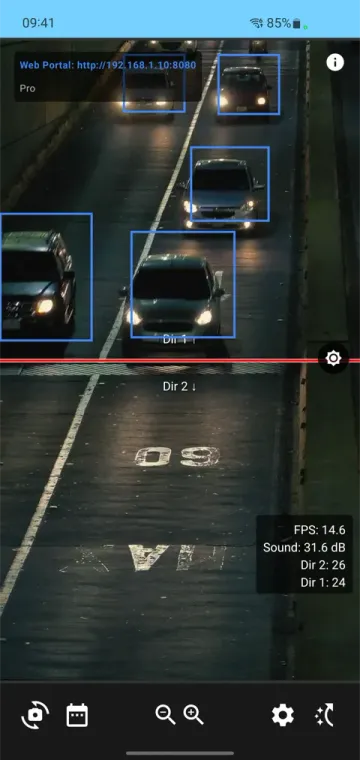
Live view — night traffic, two directions, on-device
A complete traffic counting toolkit on one phone: AI detection, tracking, directional counts, charts and data export.
Cars, trucks, buses, motorcycles and bicycles are detected and counted separately, so you get classified traffic counts instead of a single total. Turn off the types you do not need.
Place a virtual counting line across the road. Each direction gets its own counter for every vehicle type, so inbound and outbound traffic never mix.
A multi-object tracker follows every vehicle from frame to frame, ignores parked cars and filters duplicate crossings to prevent double counting.
The on-device YOLOX detection model was trained on street-level and aerial traffic images, with extra low-light, rain, fog and motion-blur variations.
Detection, tracking and storage run on the phone. No internet connection, no account and no video uploads. Your traffic data stays on the device.
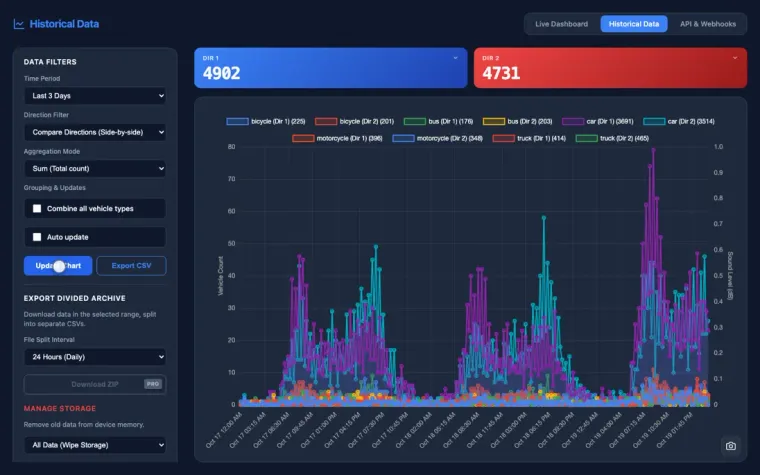
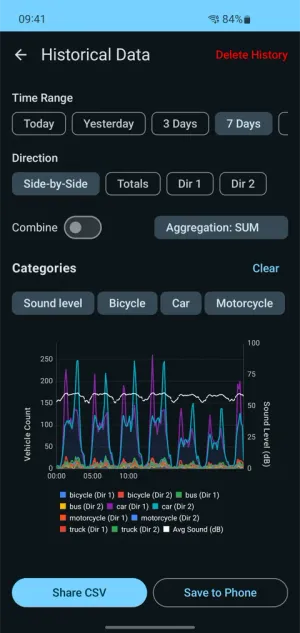
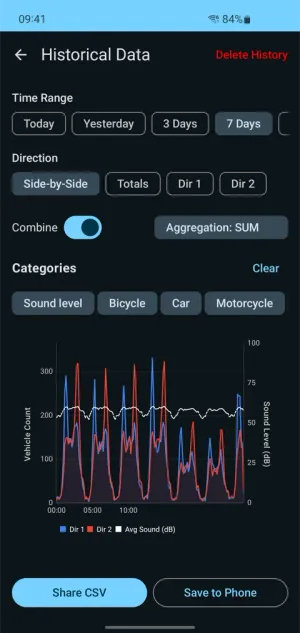
Hourly charts by vehicle type and direction show rush hours at a glance. Free keeps three days of traffic history; Pro keeps it for as long as you need.
Export vehicle counts as CSV and open them in Excel, Google Sheets or your traffic analysis software. Pro adds split ZIP archives.
Follow live video, counters and charts from any browser on the same Wi-Fi. Every new browser must be approved on the phone first.
Pro reads counts through a local REST API with bearer tokens and posts a JSON webhook for every counted vehicle, with retries and a delivery log.
Pro adds experimental speed estimates in km/h or mph over a zone of known length, plus vehicle length and size class. Estimates only, not for enforcement.
Switch on the web portal and the phone becomes a small server on your local network. Open the address shown in the app from a laptop, tablet or control room screen.
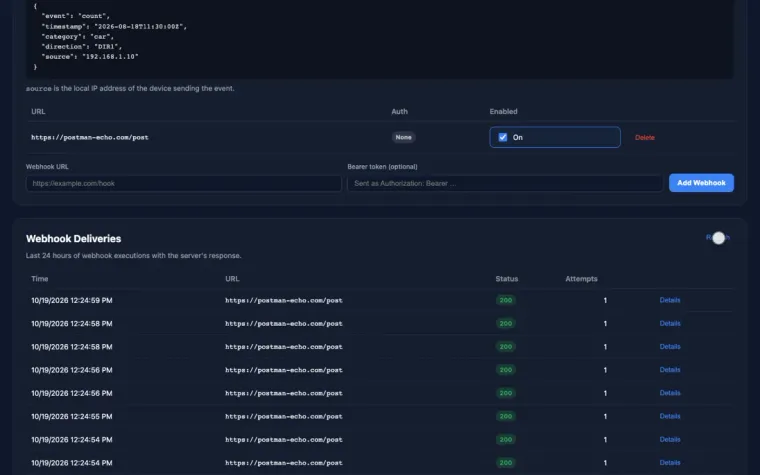
Vehicle Counter Pro exposes a local REST API and posts a JSON webhook for every counted vehicle with its type, direction and timestamp. Failed deliveries retry automatically and can be re-sent from the log.
No road tubes to nail down, no loops to cut, no servers to configure.
Install Vehicle Counter from Google Play and fix your Android phone on a tripod, pole or window with a side view of the road, so vehicles cross the image from left to right.
Place the virtual line across the lanes, choose the vehicle types to count and tune the detection sensitivity. Counting starts right away.
Watch live counts on the phone or in a browser, review traffic volumes by hour, vehicle type and direction, and export CSV files for your report.
Wherever a phone can see the traffic, you can count it.
Collect classified vehicle counts and peak-hour volumes for traffic studies and impact assessments.
Measure traffic flow on a street before and after a change, such as a new crossing or a bus lane.
Count vehicles entering and leaving a parking lot, car wash or drive-through lane.
Log trucks in and out of site gates, yards and loading areas.
Count bicycles and motorcycles separately from cars on shared streets and bike lanes.
Run transport studies, student projects and computer vision demos with real traffic data.
Both apps share the same on-device vehicle detection. Pro is a one-time purchase, no subscription, that removes ads and adds unlimited history, the API, webhooks and more.
| Feature | Free | Pro |
|---|---|---|
| Real-time AI vehicle counting, 5 classes | ● | ● |
| Two-way virtual line counting | ● | ● |
| 100% on-device, works offline | ● | ● |
| Local web dashboard with live view | ● | ● |
| Traffic history | Last 3 days | Unlimited, custom ranges |
| History save interval | Fixed at 10 min | 1 min, 5 min, 10 min or 1 hour |
| CSV export | After a short ad | ● |
| REST API and webhooks | — | ● |
| ZIP export of split CSV archives | — | ● |
| Sound level monitor (dB) | — | ● |
| Speed and vehicle length estimates (experimental) | Preview only | ● |
| GPU or CPU detection engine choice | — | ● |
| Ad-free experience | — | ● |
For many short-term traffic counts and studies, yes. Vehicle Counter turns a phone into a video-based traffic counter that detects, tracks and counts vehicles by type and direction, without road tubes or induction loops. It is not a certified counting device, so check the results against a manual count at your site.
Cars, trucks, buses, motorcycles and bicycles. Each type is counted separately in both directions, and you can turn off the types you do not need.
The app uses an on-device AI detection model with multi-object tracking to avoid double counting. Accuracy depends on camera position, distance, lighting and traffic density. For best results, film the road from the side so vehicles cross the image from left to right, keep the phone steady and adjust the detection sensitivity.
Yes, on lit roads. The detection model was trained with low-light images. Accuracy drops on very dark roads or with strong headlight glare, so test your camera position first.
No. Detection, tracking and data storage run on your Android device. The app works offline, and the web dashboard is served over your local network only.
No. Camera frames are never uploaded to the cloud, and the app does not require an account. Vehicle counts, and in Pro the sample photos used for length estimates, are stored only on the device.
Vehicle Counter Pro includes experimental speed and length estimates. You mark a zone of known length on the road, and each vehicle that crosses it gets an estimated speed in km/h or mph. Expect errors of 10% or more. Do not use the estimates for enforcement or safety decisions.
Use Share CSV or Save to Phone in the Historical Data screen, or Export CSV from the web dashboard. In the free version, each export unlocks after a short ad. Pro exports without ads and can also download split CSV archives as a single ZIP file.
Both versions use the same detection engine, work offline and include the live web dashboard. Free keeps three days of history and shows ads. Pro is a one-time purchase with no subscription: it removes ads and adds unlimited history, custom save intervals, the REST API and webhooks, ZIP export, a sound level monitor and experimental speed and length estimates.
Android 7.0 or later on phones and tablets with a camera. The app uses the GPU when it is available and falls back to a lighter CPU model on older devices.
Install in seconds and start counting traffic today. Android phones and tablets.